
AI notetaker for Discord remote planning: Auto-join and summaries
Discover how AI notetakers for Discord enhance remote planning with auto-join, transcription, and summaries for efficient meetings.

AI Notetaker for Discord Remote Planning: Auto-Join and Summaries
AI notetakers for Discord automatically join voice channels, transcribe conversations in real-time, and generate summaries with action items. Tools like Harmony manage calendars and execute post-meeting actions, while alternatives like NotesBot support 100+ languages with ChatGPT-powered summaries. These bots eliminate manual note-taking, enabling remote teams to stay focused during calls while capturing every decision and task assignment.
Key Facts
• Multi-language support: Leading Discord notetakers handle 57-100+ languages for global teams
• Privacy-first deployment: Harmony ensures data stays within your private cloud with deployment to existing infrastructure in one day
• Automated workflows: Background agents analyze organizational activity to suggest and execute follow-up actions automatically
• Cost-effective scaling: Teams can share single subscriptions using Discord roles, with plans starting at $3/month for 5 recording hours
• Instant documentation: AI-powered summaries convert 45-minute meetings into organized notes with speaker attribution and action items
Remote teams relying on Discord can reclaim lost context when an AI notetaker for Discord automatically joins every stand-up, transcribes speech, and surfaces action items. Instead of scrambling to document decisions after the call ends, engineers and product leads can stay fully present, knowing that a bot quietly records every word, tags who said what, and delivers a concise summary moments after the session wraps.
What an AI Notetaker for Discord Actually Does
What exactly happens when a bot drops into your voice channel and starts listening?
An AI notetaker for Discord automates four core tasks inside voice channels:
Automated recording begins the moment you issue a command or schedule the bot to join.
Transcription converts speech to text using voice and speech recognition combined with machine learning to organize meeting content in real time.
Speaker diarization attributes each segment of text to the participant who spoke it, so the final transcript reads like a labeled script rather than an anonymous wall of text.
Summarization distills the full transcript into bullet-point highlights, decisions, and action items powered by large language models.
AI note-taking is defined as "the process of using AI technologies, algorithms, and language models to enhance and streamline the process of taking, organizing, and managing notes." That definition extends naturally to Discord, a platform built for voice, video, and text channels where communities and distributed teams already hold synchronous conversations.
The result is a searchable, shareable record that lives alongside your server, ready to be referenced whenever someone asks, "What did we decide last Tuesday?"
Why Remote-Planning Teams Need Smarter Discord Meeting Notes
Manual note-taking during stand-ups and sprint reviews costs more than most managers realize.
64% of all meetings have at least one participant who arrives late, and the average delay runs 3 minutes and 18 seconds.
51% of meetings go past their scheduled time, stretching calendars and compressing focus blocks.
Remote workers attend, on average, one more meeting per day than when they were in the office.
Employees spend 25% of their time looking for information they need to do their jobs, and most toggle between apps 10 times an hour, costing organizations 32 days of productivity per worker, per year.
The productivity drain intensifies for engineering teams. 70% of tech leaders say that effective communication and collaboration practices reduce the time needed to complete projects and deploy code, yet 62% cite time-zone differences as a barrier to connecting.
A human-centric work design that embraces flexible, asynchronous tools boosts performance by 28 percentage points while reducing fatigue. AI notetakers fit squarely into that design by capturing context without forcing everyone onto the same clock.
Key takeaway: When stand-ups are recorded and summarized automatically, teams reclaim the mental bandwidth previously spent on manual documentation and information retrieval.
Which Core Capabilities Should Your AI Discord Notetaker Offer?
Before evaluating specific tools, map each capability to the problems it solves.
| Capability | What It Does | Why It Matters |
|---|---|---|
| Auto-join | Bot enters the voice channel the instant a call starts via a simple command like /join | No one forgets to hit record |
| Live transcription | Converts speech to text in real time with high accuracy | Creates a searchable record while the meeting is still in progress |
| Speaker diarization | Assigns speaker names to each transcribed segment | Accountability for decisions and action items |
| Summary generation | Distills the transcript into bullet points, highlights, and next steps | Reduces review time from 45 minutes to 2 minutes |
Diarization is how a transcript gets speaker attribution, determining which speaker each word belongs to. Some providers rely on "speaker change" events from the meeting platform, while others use voice signatures to cluster similar embeddings. The best tools combine both approaches in a hybrid model that handles shared devices and remote participants alike.
Microsoft's Azure Speech service reports that its real-time diarization model improved quality by approximately 3% on Word Diarization Error Rate (WDER) since public preview, with over a thousand customers across medical, banking, and legal industries already using the feature.
For Discord specifically, look for bots that support commands such as /join, /stop, and /config so your team can customize language, summary style, and privacy settings without leaving the chat window.
How Does Harmony's Discord-First Bot Go From Record to Action in 2 Minutes?
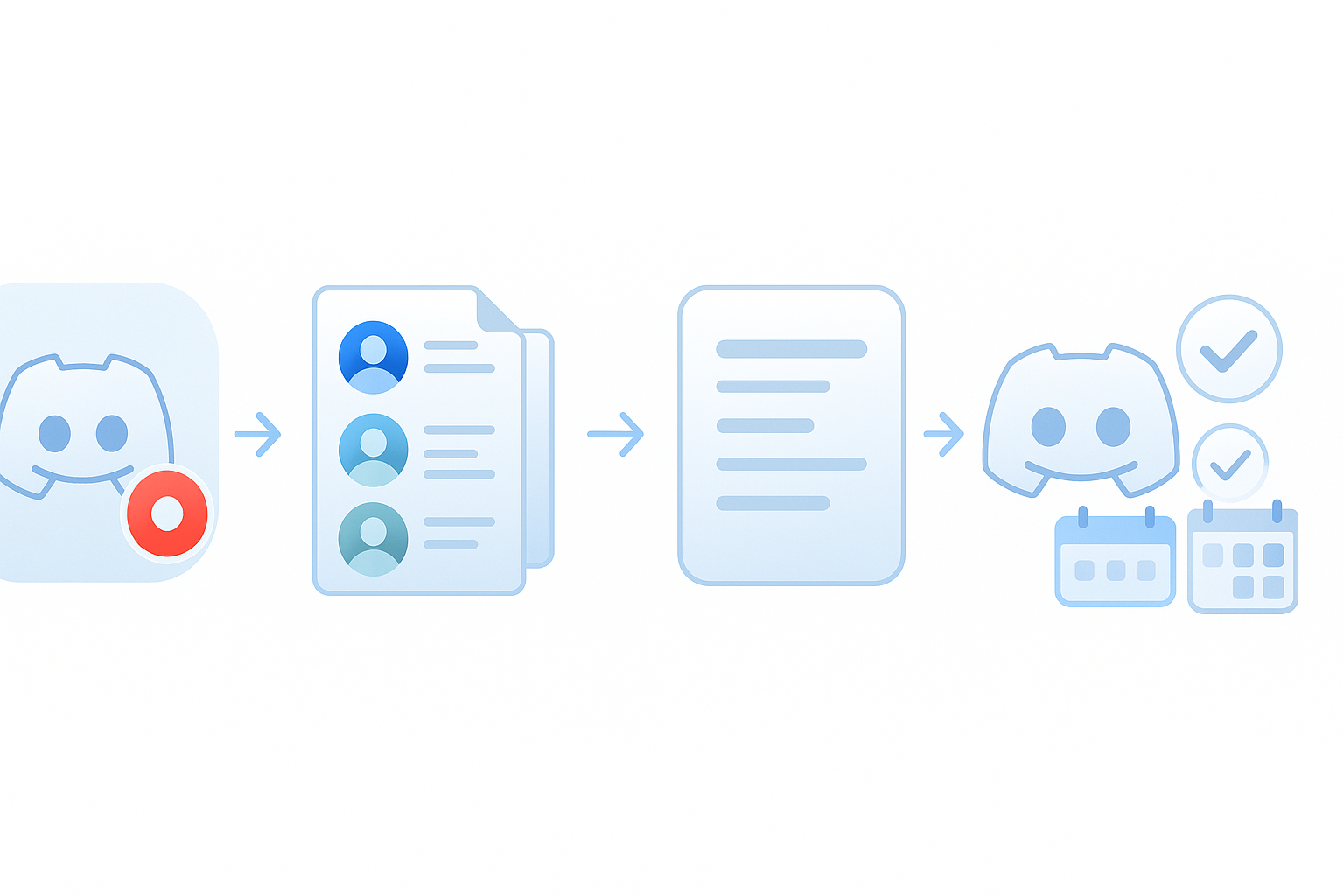
Harmony is built specifically for teams that run synchronous communication inside Discord. Setup takes two steps:
Invite the bot to your server.
Run
/recordto start recording and/stopto stop and analyze the meeting.
Once the session ends, Harmony delivers:
A multi-channel transcription with speaker attribution
An AI-generated summary highlighting decisions and action items
A conversational interface called AskHarmony that lets you query meeting content in natural language
Harmony manages your calendar, creates meeting prep docs, and executes post-meeting actions so managers spend less time on administrative overhead. Background agents analyze every activity in the organization to suggest and execute follow-up tasks automatically.
Privacy is a first-class concern. Harmony ensures that your data does not flow out of your private cloud, and the team can deploy the service to your existing infrastructure within a day with no additional overhead.
Users report saving 5+ hours weekly and experiencing 40% better follow-through on action items when transcription and summarization are automated.
How Harmony Stacks Up Against NotesBot, DiscMeet & Fireflies
Comparing Discord-native and cross-platform alternatives clarifies where Harmony fits.
| Tool | Platform Focus | Languages | Auto-Join | Speaker Diarization | Integrations |
|---|---|---|---|---|---|
| Harmony | Discord-first | 57+ | Yes | Yes | Web dashboard, AskHarmony chat |
| NotesBot | Discord | 100+ | Yes | Yes | Discord delivery only |
| DiscMeet | Discord | Limited | Yes | Limited | Export to PDF, Word, plain text |
| Fireflies.ai | Zoom, Meet, Teams | 100+ | Yes | Yes | 90+ apps |
Fireflies.ai earns a 4.8 out of 5 star rating based on 706 reviews and is described as a "Well-Integrated, Fully Automated Meeting Intelligence Platform" with an AskFred feature that lets users query meeting content directly. However, Fireflies requires calendar access and sends a bot named Fred to auto-join calls, which some teams find intrusive.
NotesBot supports 100+ languages and offers tiered plans starting at $3/month for 5 hours of recording, but its output is limited to Discord delivery with no external integrations.
DiscMeet provides 95%+ transcription accuracy for clear audio and exports in multiple formats, yet it lacks the conversational search and post-meeting automation that Harmony offers.
"It is so simple to use, we just add fred@fireflies.ai to the invite and the bot would join the event," one user notes. Simplicity matters, but teams already living inside Discord benefit from a tool that never leaves the platform.
Key takeaway: If your team runs stand-ups, retros, and planning sessions on Discord, Harmony's native integration and AskHarmony search provide a tighter workflow than cross-platform tools that require calendar syncing.
How Do You Turn Discord Calls Into Actionable Plans?
Follow this playbook to convert voice conversations into documented decisions.
Stand-Ups (Daily, 15 Minutes)
Run
/recordas the first person enters the voice channel.Each engineer shares blockers and priorities verbally.
Run
/stopwhen the round-robin finishes.Review the AI summary in the designated text channel.
Assign action items using the speaker-attributed transcript as your source of truth.
Sprint Reviews (Biweekly, 30-60 Minutes)
Enable the Include Transcript toggle before exporting to Notion or Google Docs.
Use diarization to identify which engineer demonstrated each feature.
Share the summary link with stakeholders who missed the live session.
Retrospectives (Biweekly, 45 Minutes)
Review participation balance: 28% of meetings have unbalanced participation.
Identify silent contributors and invite them to add written comments in a follow-up thread.
Archive the transcript alongside your sprint board for future reference.
By anchoring each ceremony to a recorded transcript, teams close the gap between discussion and documentation.
What Integrations Keep Your Notes Where Your Team Works?
Notes are only useful if they appear where your team already collaborates.
AI notetakers can connect with 5,000+ apps using Zapier, route summaries to Notion workspaces, or export as PDF, DOCX, or plain text.
Common export paths include:
Notion: Create a new page per meeting with formatted headings, lists, and tables.
Google Docs: Sync transcripts directly to shared drives.
OneNote / Evernote: Push notes to personal or team notebooks.
Slack / Microsoft Teams: Auto-post summaries to a dedicated channel.
Gartner predicts that by 2025, 70% of digital workplace service transactions will be supported or completed by automation, up from less than 30% today. Integrating your AI notetaker with productivity suites accelerates that shift by eliminating manual copy-paste workflows.
Key Takeaways: Capture, Search, Act — All Inside Discord
An AI notetaker for Discord closes the loop between conversation and action:
Capture every word with auto-join recording and live transcription.
Search past meetings using conversational queries instead of scrolling through chat logs.
Act on decisions immediately with speaker-attributed action items exported to your project management tools.
Harmony shows you issues that need attention and suggests resolutions before they snowball, turning your Discord server into a living knowledge base rather than a graveyard of ephemeral voice calls.
If your remote-planning workflow already lives on Discord, adding an AI notetaker is the fastest path to reclaiming the hours lost to manual documentation and the context lost to forgotten conversations.
Frequently Asked Questions
What is an AI notetaker for Discord?
An AI notetaker for Discord is a bot that automatically joins voice channels to record meetings, transcribe speech to text, and generate concise summaries. It helps teams capture every word, attribute speech to participants, and create searchable records of meetings.
How does Harmony's AI notetaker work?
Harmony's AI notetaker for Discord automatically joins voice channels, records meetings, and provides multi-channel transcriptions with speaker attribution. It generates AI summaries highlighting decisions and action items, and offers a conversational interface for querying meeting content.
Why do remote teams need AI notetakers for Discord?
Remote teams benefit from AI notetakers as they automate the documentation process, allowing team members to focus on discussions without worrying about taking notes. This leads to better meeting recall, reduced manual documentation, and improved productivity.
What are the core capabilities of an AI Discord notetaker?
Core capabilities include auto-join for seamless recording, live transcription for real-time text conversion, speaker diarization for attributing speech to participants, and summary generation to distill meetings into actionable insights.
How does Harmony ensure data privacy?
Harmony prioritizes data privacy by ensuring that user data does not leave their private cloud. The service can be deployed to existing infrastructure within a day, maintaining security and privacy standards.
Sources
- https://getharmony.ai/
- https://notesbot.io/
- https://www.zoom.com/pl/products/ai-assistant/features/ai-note-taking/
- https://www.microsoft.com/en-us/microsoft-365/business-insights-ideas/resources/ai-summarizer-note-taking-tools
- https://relevanceai.com/integrations/discord
- https://www.read.ai/benchmarks
- https://www.gartner.com/en/articles/gartner-says-u-s-employees-working-remotely-attend-on-average-one-more-meeting-a-day-than-when-they-were-in-the-office
- https://www.gartner.com/en/information-technology/glossary/digital-workplace
- https://linearb.io/resources/effective-communication-in-engineering-teams-report
- https://www.gartner.com/en/human-resources/trends/hybrid-and-remote-work
- https://docs.recall.ai/docs/diarization
- https://techcommunity.microsoft.com/blog/azure-ai-services-blog/announcing-general-availability-of-real-time-diarization/4147556
- https://discmeet.com/discord-transcription
- https://www.g2.com/products/fireflies-ai/reviews
- https://fireflies.ai/blog/ai-note-taker-for-teams
- https://help.wave.co/en/articles/8774169-sharing-and-exporting-your-wave-sessions
- https://assemblyai.com/docs/integrations
- https://relevanceai.com/docs/integrations/popular-integrations/notion