
Discord AI notetaker with conversational search: Ask your transcripts
Discover how Discord AI notetakers transform voice channels into searchable knowledge bases, enhancing team productivity and decision-making.
Discord AI notetaker with conversational search: Ask your transcripts
Discord AI notetaker technology automatically joins voice channels to record, transcribe, and summarize conversations, creating searchable knowledge bases that help teams save over four hours weekly through automated documentation. These Discord-native bots transform ephemeral voice discussions into permanent records with AI-generated summaries and full transcripts, ensuring important decisions and action items are never lost.
At a Glance
• Discord AI notetakers join voice channels via simple commands like /record and automatically generate transcripts, summaries, and action items after each session
• Teams using automated transcription report 25% reduction in meeting time and 30% productivity increases, with 62% of users saving over four hours weekly
• Modern solutions support 57+ languages with real-time transcription, achieving approximately 150ms latency for near-instant text display
• Conversational search capabilities let teams query their meeting history with natural language questions instead of keyword searches
• The AI transcription market will grow from $4.5 billion in 2024 to $19.2 billion by 2034, driven by accuracy improvements and integration capabilities
• Setup requires less than two minutes with no configuration needed, using straightforward Discord bot permissions and slash commands
Discord AI notetaker technology turns every voice channel into an indexed, searchable knowledge base so teams never lose decisions again.
What is a Discord AI Notetaker?
A Discord AI notetaker is a bot that automatically joins voice channels, records conversations, transcribes speech, and produces AI-generated summaries for your team. Unlike generic transcription tools, these bots are purpose-built for Discord's voice channel architecture, making them a native fit for communities and teams who rely on the platform for synchronous communication.
Tools like NotesBot demonstrate the core functionality: they record, transcribe, and summarize Discord calls while delivering full-text transcripts and MP3 recordings. The underlying technology uses advanced speech recognition to convert audio into searchable text, then applies large language models to extract key points, decisions, and action items.
What makes this category compelling is real-time accuracy. Platforms like Otter show the benchmark for real-time, accurate AI transcription that lets participants follow along live, revisit missed moments, or pull key takeaways before a call even ends. When applied to Discord, this capability means your team discussions become permanent, searchable records rather than ephemeral conversations.
The productivity impact is measurable. Organizations implementing AI meeting transcription experience 25% reduction in meeting time and 30% productivity increases, making the investment worthwhile for teams of any size.
Key takeaway: A Discord AI notetaker transforms voice conversations into actionable knowledge assets that the entire team can search and reference indefinitely.
Why Discord Teams Need Searchable Meeting Transcripts
The modern meeting problem is well-documented. Executives now spend nearly 23 hours per week in meetings, a dramatic increase from less than 10 hours in the 1960s. For distributed teams using Discord, the challenge compounds: important decisions happen in voice channels, but without documentation, that institutional knowledge vanishes when the call ends.
Searchable transcripts solve three critical problems:
Productivity recovery. 62% of users save over four hours weekly through automated transcription, equivalent to reclaiming more than a month of productive work annually. Instead of manually reviewing recordings or relying on incomplete notes, team members can search for specific topics, decisions, or action items instantly.
Knowledge retention. Gaming guilds, project teams, and community moderators all face the same issue: discussions happen, decisions are made, but weeks later nobody remembers exactly what was agreed. Transcripts create a permanent record that new members can search to get up to speed.
Accessibility and inclusion. AI transcription directly addresses participation barriers for team members with hearing impairments, attention challenges, or those joining calls in noisy environments. When 81% of employees say AI tools improve productivity, accessibility features contribute meaningfully to that number.
| Challenge | Impact Without Transcription | Impact With Searchable Transcripts |
|---|---|---|
| Decision recall | Relies on memory and incomplete notes | Instant search for exact wording |
| Onboarding new members | Requires extensive catch-up meetings | Self-service access to historical context |
| Time zone gaps | Missed information for absent teammates | Full async access to meeting content |
| Accountability | Verbal commitments easily forgotten | Documented action items and assignments |
How does Harmony capture, summarize, and index your calls?
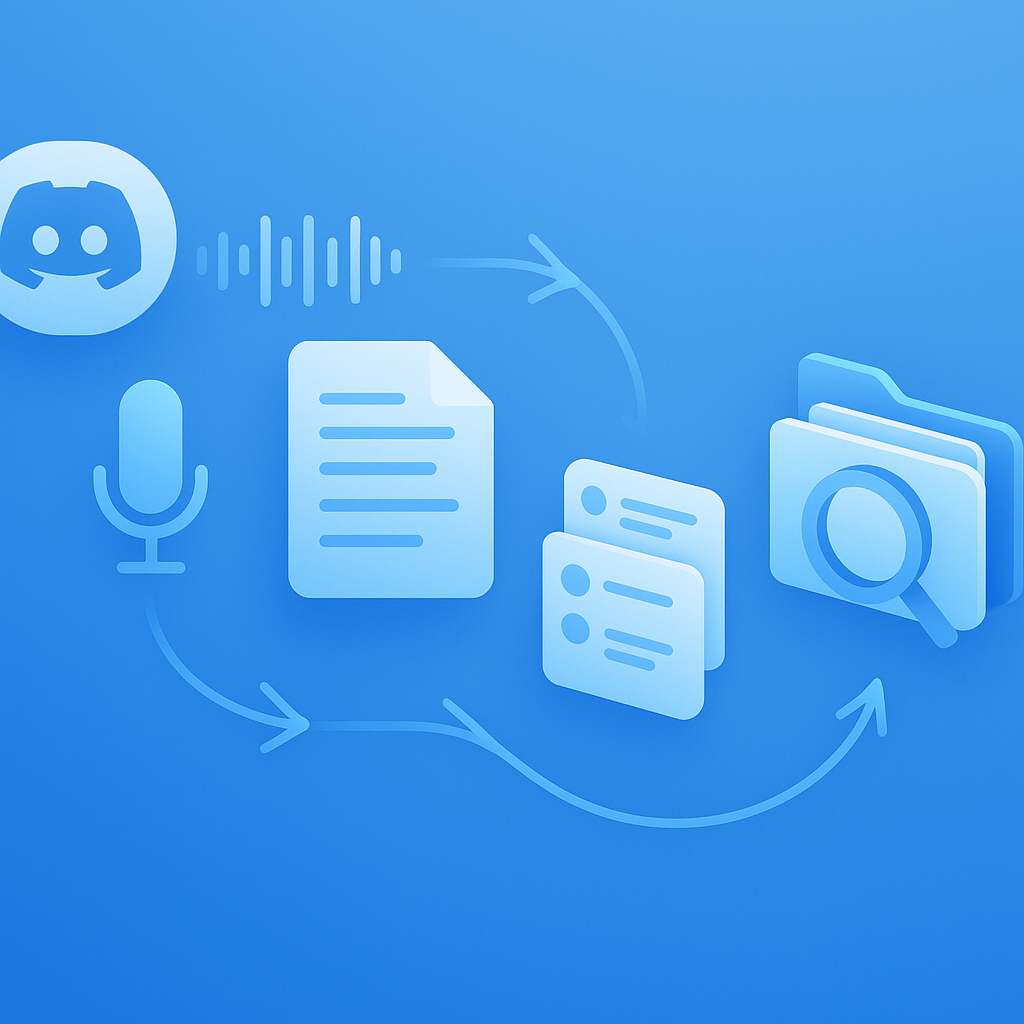
Harmony's pipeline moves your Discord conversations through four distinct stages, transforming raw audio into queryable knowledge.
Stage 1: Recording. When you run the /record command, Harmony joins your voice channel and captures multi-channel audio, preserving speaker separation. This architecture matters because it enables accurate speaker attribution in the final transcript, so you know exactly who said what.
Stage 2: Transcription. The audio streams through speech-to-text models supporting 57+ languages. Modern transcription technology can stream audio and receive transcriptions in approximately 150 ms, enabling near-real-time understanding for live agents, meetings, and conversational AI. Research demonstrates that state-of-the-art multilingual models like Mu2SLAM improve on translation benchmarks by 1.9 BLEU points over previous approaches, representing meaningful accuracy gains for multi-language teams.
Stage 3: Summarization. Large language models process the complete transcript to generate structured output: bullet-point summaries, extracted action items, highlighted decisions, and key discussion topics. Setup is lightweight, requiring less than a minute with no configuration for similar Discord-native tools.
Stage 4: Indexing. Transcripts and summaries feed into a searchable index, enabling both keyword search and the conversational queries that power AskHarmony. Every meeting becomes part of your team's growing knowledge base.
The /stop command ends the session and triggers analysis, delivering your summary directly to a designated text channel.
AskHarmony: Conversational Search Over Your Meeting Knowledge Base
What happens when you need to find something specific from three months of recorded meetings? Traditional keyword search helps, but conversational search transforms the experience entirely.
AskHarmony layers a large language model over your indexed meeting transcripts. Instead of constructing precise keyword queries, you can ask natural questions like "What did the team decide about the Q3 launch date?" or "When did we discuss the API rate limiting issue?"
The technical architecture behind conversational search aims to maximize users' information gain over multiple dialogue turns, meaning the system can handle follow-up questions that refine or expand on previous queries. Ask about a decision, then ask who was assigned the follow-up task, then ask what deadline was mentioned, all within a single conversation thread.
Otter demonstrates this pattern well: with their AI Chat, you can ask questions about your meetings like "What did Sam say about pricing?" or "What are the next steps?" and get instant answers. AskHarmony brings this capability to Discord-native teams.
Research on meeting assistant benchmarks confirms that modern LLMs handle this use case well. The ELITR-Bench benchmark evaluates long-context language models specifically for meeting assistants, finding that models remain robust even on noisy ASR-based documents, which matters for real-world Discord calls with varying audio quality.
Practical applications include:
- Searching across all meetings for mentions of specific projects, clients, or features
- Pulling up the exact context around a decision when questions arise later
- Generating summaries of all discussions on a particular topic across multiple calls
- Finding action items assigned to specific team members
How does Harmony stack up against Otter & Fireflies?
Otter and Fireflies dominate the general meeting transcription market, but neither natively supports Discord. Understanding their strengths clarifies what Discord teams actually need.
Otter.ai leads transcription accuracy with 95% precision and seamless real-time collaboration features. Their AI Chat for querying meeting content sets the standard for conversational search. Pricing starts at $8.33/month for Pro plans with 1,200 minutes. However, Otter integrates with Zoom, Microsoft Teams, and Google Meet. Discord support is absent.
Fireflies takes 15-20 minutes to generate transcriptions after meetings end rather than providing real-time access. They emphasize conversation intelligence with advanced analytics and CRM integrations, positioning the tool for sales teams. The Pro tier costs $10/month and includes 8,000 minutes. Like Otter, Fireflies lacks Discord integration.
Otter.ai outperforms the competition with about 95% accuracy, especially in multi-speaker or accent-heavy sessions. Fireflies averages 90-93% depending on audio clarity.
| Feature | Otter | Fireflies | Harmony |
|---|---|---|---|
| Discord native | No | No | Yes |
| Real-time transcription | Yes | Delayed 15-20 min | Yes |
| Conversational search | Yes | Limited | Yes (AskHarmony) |
| Multi-language | English only | 69+ languages | 57+ languages |
| Speaker attribution | Yes | Yes | Yes |
| Setup time | Calendar integration | Calendar integration | 2 minutes |
For teams whose communication lives on Discord, the platform gap matters more than marginal accuracy differences. Harmony delivers comparable capabilities where your team actually meets.
How do you get started with commands, permissions & privacy?
Getting Harmony running takes less than two minutes. Here's the process:
Step 1: Invite the bot. Add Harmony to your Discord server through the standard bot invitation flow. The bot requires permission to join voice channels and post in text channels.
Step 2: Configure permissions. Discord bot data access is unique to each bot, based on selected settings and verification status. You can check exactly what data Harmony accesses by opening its profile and viewing the Data Access tab.
Step 3: Start recording. Essential commands are straightforward:
/recordjoins your voice channel and starts recording/stopends the session and triggers analysis/statuschecks remaining transcription time/helpdisplays the complete command guide
Privacy considerations. Discord maintains strict policies around bot data usage. The Developer Policy explicitly states: "Do not use message content obtained through the APIs to train machine learning or AI models unless express permission is granted by Discord." Harmony operates within these guidelines, processing your transcripts for your team's use without feeding content into external training datasets.
All bots have baseline access to voice channel metadata including muted, deafened, streaming, or video status of members. Recording-specific permissions require explicit channel access grants, giving server admins full control over where the bot can operate.
The Future of Real-Time Meeting Intelligence
The market trajectory points clearly upward. The global Video Conferencing Transcribing market is projected to reach $2,500 million by 2025, with a robust 18% CAGR anticipated through 2033. The broader AI transcription market will surge from $4.5 billion in 2024 to $19.2 billion by 2034, driven by accuracy improvements and cost advantages over manual methods.
Several technical developments will reshape meeting intelligence:
Sub-second transcription. Current state-of-the-art achieves approximately 150 ms latency across 90+ languages, enabling true real-time displays during calls. As this technology matures, live transcription will become indistinguishable from captions.
Agentic AI integration. Survey data shows 96% of technologists agree that agentic AI innovation will continue at lightning speed through 2026. Meeting assistants will evolve from passive recorders to active participants that can schedule follow-ups, create tasks in project management tools, and surface relevant context from past meetings during live calls.
Market consolidation around quality. The AI assistant market is projected to grow from $3.35 billion in 2025 to $21.11 billion by 2030 at a 44.5% CAGR. As the market matures, teams will increasingly demand accuracy, integration depth, and privacy compliance rather than basic transcription features.
For Discord communities, these trends mean meeting intelligence will become standard infrastructure rather than optional tooling. The question isn't whether to adopt these capabilities, but when.
Key Takeaways
Discord AI notetakers transform ephemeral voice conversations into permanent, searchable team knowledge. The core value proposition is straightforward: capture everything, surface anything, never lose decisions again.
Discord was created to be a platform that brings people together over shared experiences. Meeting intelligence tools extend that mission by ensuring those shared experiences don't disappear when the voice channel closes.
The practical benefits are measurable:
- Teams save hours weekly by searching transcripts instead of re-listening to recordings
- New members onboard faster with access to historical context
- Accountability improves when action items are documented automatically
- Accessibility expands for team members who benefit from text alternatives
Setup takes less than a minute with no configuration required for modern Discord transcription bots. The essential workflow is simple: /record to start, /stop to analyze, then search or ask questions about your meeting history.
For teams already running standups, planning sessions, or community meetings on Discord, Harmony offers the natural next step: making those conversations as searchable and valuable as any written documentation. Visit harmonynotetaker.ai to add transcription and conversational search to your server.
Frequently Asked Questions
What is a Discord AI notetaker?
A Discord AI notetaker is a bot that joins voice channels to record, transcribe, and summarize conversations, making them searchable and actionable for teams using Discord.
How does Harmony's AI notetaker work?
Harmony captures Discord conversations through recording, transcription, summarization, and indexing, turning them into searchable knowledge assets. It supports multi-channel audio and 57+ languages.
Why are searchable meeting transcripts important for Discord teams?
Searchable transcripts help recover productivity, retain knowledge, and improve accessibility by providing a permanent record of discussions, decisions, and action items.
How does AskHarmony enhance meeting transcript searches?
AskHarmony uses conversational search, allowing users to ask natural questions about meeting content, refining queries with follow-up questions for detailed insights.
What are the privacy considerations for using Harmony on Discord?
Harmony adheres to Discord's strict data usage policies, ensuring transcripts are processed for team use without external data training, and requires explicit channel access permissions.
Sources
- https://sonix.ai/resources/automated-transcription-statistics/
- https://notesbot.io/
- https://elevenlabs.io/realtime-speech-to-text
- https://otter.ai/blog/otter-vs-fireflies-which-ai-meeting-tool-is-better
- https://slack.com/blog/collaboration/how-to-set-the-perfect-meeting-cadence-for-remote-teams
- https://slack.com/blog/productivity/ai-meeting-note-taker-how-it-works-and-features-to-look-for
- https://export.arxiv.org/pdf/2212.09553v2.pdf
- https://hedabot.com/
- https://aclanthology.org/2024.nlp4convai-1.5.pdf
- https://aclanthology.org/2025.coling-main.28.pdf
- https://aloa.co/ai/comparisons/ai-note-taker-comparison/otter-ai-vs-fireflies-ai
- https://www.index.dev/blog/otter-vs-fireflies-vs-fathom-ai-meeting-notes-comparison
- https://support.discord.com/hc/en-us/articles/7933951485975-Visibility-of-Bot-Data-Access
- https://support-dev.discord.com/hc/en-us/articles/8563934450327-Discord-Developer-Policy
- https://www.datainsightsmarket.com/reports/video-conferencing-transcribing-1955258
- https://www.ieee.org/newsroom/pressreleases/2025/ieee-techblick-2026-predictions.html
- https://www.marketsandmarkets.com/Market-Reports/ai-assistants-market-87481219.html
- https://discord.com/safety-privacy