
Fireflies not recording Discord? 5 AI meeting notes alternatives
Discover 5 reliable AI meeting note alternatives for Discord when Fireflies fails to deliver. Enhance your meeting productivity today.
Fireflies not recording Discord? 5 AI meeting notes alternatives
When Fireflies fails to record Discord meetings, it's often due to host-only auto-join limitations, permission errors, or the bot being blocked by cautious hosts. The integration only automatically joins meetings you host, and transcript delivery can take 5+ minutes, causing teams to miss critical insights from their voice channel discussions.
TLDR
- Fireflies struggles with Discord due to host-only auto-join, delayed transcripts, and frequent bot blocking issues
- DiscMeet offers real-time transcription with speaker identification and 95%+ accuracy for clear audio
- Budget option NotesBot starts at $3/month for 5 hours of recording with support for 100+ languages
- Krisp provides bot-free recording through desktop noise cancellation across 800+ communication apps
- Privacy-focused Scripty processes everything offline without sending audio to third-party servers
- Harmony delivers Discord-native AI notes with simple
/recordcommands and 57+ language support
You fired up your voice channel, ran the meeting, and waited for Fireflies to deliver the transcript. Five minutes passed. Then ten. Nothing showed up in your designated text channel, and now you are frantically searching "Fireflies not recording Discord" while the decisions from that call fade from memory.
You are not alone. The integration between Fireflies and Discord promises automatic summaries, recordings, and action items posted straight into your server. In practice, many teams hit permission errors, missed joins, or notes that never arrive. This guide explains why those gaps happen and walks through five AI meeting note alternatives built to work reliably inside Discord voice channels.
When Fireflies lets you down on Discord
Fireflies markets its Discord integration as a hands-off experience. According to the official setup guide, "The Fireflies + Discord integration automatically posts your meeting summaries, recordings, and action items directly into your designated Discord channels, keeping everyone in the loop without you having to write manual updates." (Fireflies Guide)
The reality is messier. A visible "Fireflies Notetaker" bot joins every meeting as a participant, drawing attention and sometimes getting blocked by cautious hosts (itsconvo.com). When the bot does show up, Fireflies will automatically join the voice meetings you host to record, transcribe, and summarize the conversation, but only for calls you host, and only if your server permissions line up correctly (Fireflies Guide).
Teams that run meetings hosted by different members, or that rely on busy servers with aggressive bot throttling, often see delays or outright failures.
Why does Fireflies struggle inside Discord voice channels?
Several architectural choices explain the reliability gap:
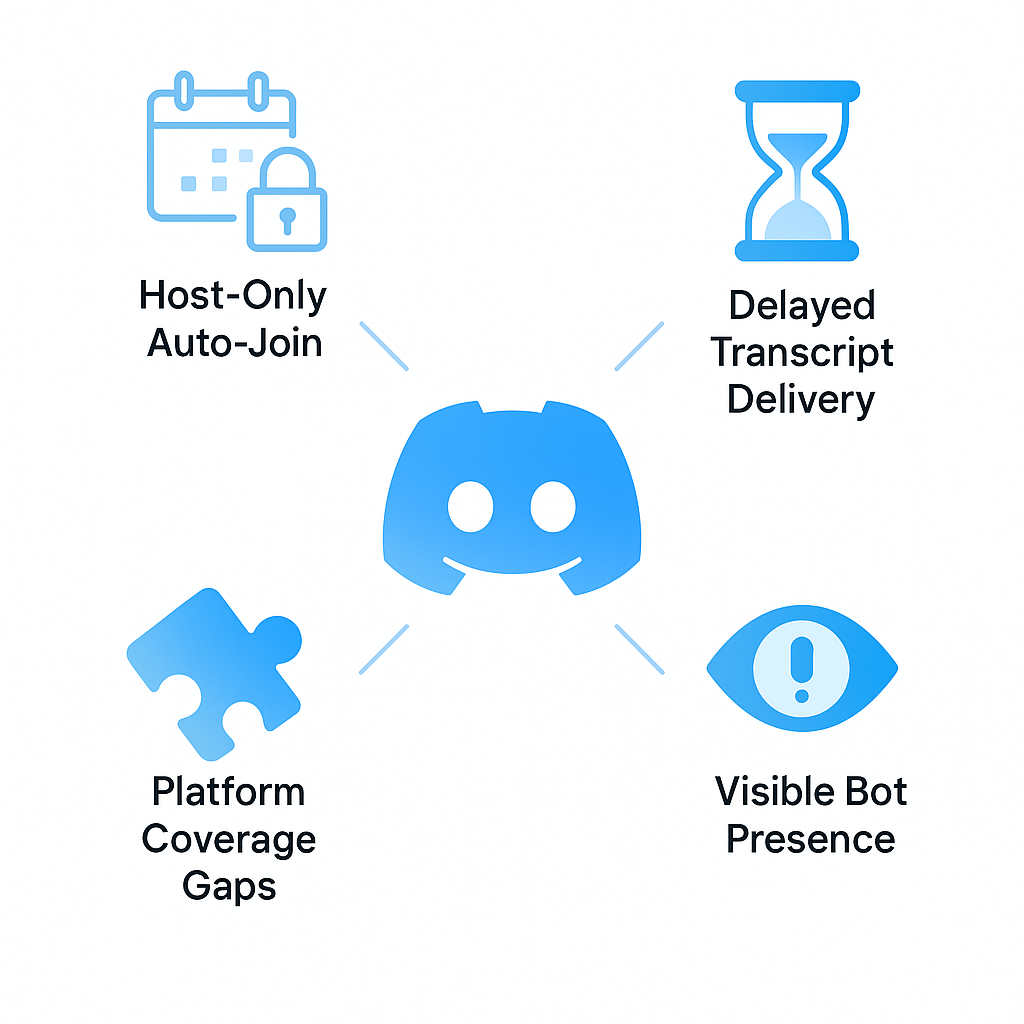
Host-only auto-join. Fireflies will only automatically join the meetings that you host. If someone else starts the call, the bot stays silent unless manually invited (Fireflies Guide).
Delayed transcript delivery. Transcript notifications generally take up to 5 minutes to be delivered to the Discord channel after the meeting ends (Fireflies Guide). On congested servers that delay can stretch further.
Platform coverage gaps. Fireflies works well with Zoom and Google Meet, but has gaps. Slack Huddles and Webex support is limited or non-existent (itsconvo.com). Discord, while technically supported, sits outside the tool's core focus.
Visible bot presence. A visible bot joins every call, alerts all participants, and can be blocked by hosts who distrust unfamiliar attendees (Meetily).
Key takeaway: Fireflies was designed around calendar-driven platforms like Zoom and Teams; its Discord support layers on top rather than integrating natively.
How to choose a reliable Discord AI note taker
Before jumping to alternatives, establish what you actually need. Choosing the best AI speech to text tool in 2025 comes down to three measurable factors: transcription accuracy, real-time streaming reliability, and noise robustness (diyai.io).
Use the checklist below to evaluate any candidate:
| Criterion | Why It Matters |
|---|---|
| Discord-native commands | Reduces setup friction and permission headaches |
| Real-time or near-real-time transcription | Lets you catch errors while context is fresh |
| Speaker diarization | Attributes statements to the right person |
| Privacy and data residency | Critical for sensitive internal discussions |
| Cost model | Per-server, per-user, or per-minute pricing affects budget predictability |
Accuracy benchmarks you can trust
Marketing pages love to claim 95%+ accuracy, but real-world performance depends on audio quality, accents, and background noise. Finding an AI note taker with the best transcription accuracy involves looking beyond marketing claims. While tools like Fireflies.ai claim up to 95% accuracy, real-world performance often hovers between 85-95% (affine.pro).
Independent benchmarks help. Soniox evaluated 10 major providers across 60 languages using YouTube audio with diverse acoustic conditions (Soniox). Meanwhile, Deepgram Nova-3 cuts word error rates 54.2% vs competitors in its own testing (Deepgram).
When evaluating a Discord bot, request sample transcripts from noisy voice channels before committing.
Bot visibility & data residency
Some teams need recordings to stay invisible to participants or to never leave company infrastructure.
Hidden recording: Tools that capture system audio locally avoid the visible-bot problem entirely. Meetily, for example, offers 100% local processing, zero external servers, making it suitable for confidential discussions (Meetily).
Offline transcription: Scripty is the only bot out there that does this all offline, without sending any of your voice to third-parties, like Facebook or Google (Scripty). That matters when compliance or trust requirements forbid cloud uploads.
Is DiscMeet the real-time Discord meeting notes solution?
DiscMeet positions itself as a full-stack replacement for Fireflies inside Discord. The service automatically creates meeting notes from your Discord calls, capturing action items, decisions, and summaries without manual effort (DiscMeet).
Core capabilities include:
Real-time transcription. Get live transcripts as calls happen, so you can correct errors or highlight key moments before the meeting ends (DiscMeet Transcription).
Speaker identification. DiscMeet can record and transcribe group calls with multiple participants, identifying each speaker (DiscMeet Call Transcript).
High accuracy. DiscMeet uses advanced AI speech recognition with 95%+ accuracy for clear audio (DiscMeet Transcription).
Flexible exports. Transcripts export to PDF, Word, or plain text for archival or sharing outside Discord.
DiscMeet suits remote teams, gaming communities, educational groups, and content creators who need reliable transcription without leaving Discord.
Need a budget-friendly Discord recorder? Meet NotesBot
NotesBot appeals to teams watching every dollar. The bot records, transcribes, and summarizes Discord calls with support for 100+ languages (NotesBot).
Pricing tiers:
| Hours per month | Price |
|---|---|
| 5 | $3/mo |
| 10 | $5/mo |
| 30 | $15/mo |
| 40 | $20/mo |
| 100 | $40/mo |
Setup takes seconds. Type /join to start recording your voice channel, then /leave to stop and receive an AI summary (NotesBot). Additional commands like /config let you customize language and AI behavior, while /ignore @user excludes participants who opt out.
Teams can share one subscription across members using Discord roles, keeping costs predictable even as headcount grows.
Heda - Technical-term-aware bot for developer communities
Developer servers often drown in jargon: API names, framework acronyms, and product codenames that generic transcription engines mangle. Heda addresses that gap by accurately transcribing technical terms, product names, and industry-specific language (Heda).
Notable perks for dev teams:
Discord-native design. Built specifically for Discord communities, not adapted from meeting tools (Heda).
Flat server pricing. Heda charges a flat fee per server, not per user, which scales better for large open-source projects or gaming guilds.
Instant setup. Type
/jointo have Heda join your voice channel; the bot begins transcribing immediately with no configuration required.
One community lead shared the impact: "We've reduced repeated questions by 40% since our support sessions became searchable." (Heda)
Pricing starts at $10/user/month for the Pro plan and $25/user/month for Business, with unlimited transcription and API access at higher tiers.
Why choose Krisp for noise-free Discord recordings?
Krisp takes a different approach: instead of adding a bot to your voice channel, it sits on your desktop and filters audio before it reaches any communication app.
Krisp offers real-time noise cancellation, transcription, and automated meeting recordings across Discord and more than 800 other communication apps (Krisp Discord).
Feature highlights:
AI Noise Cancellation. Eliminates barking dogs, keyboard clatter, and street noise so transcripts capture speech, not chaos.
CRM sync. Krisp AI note taker connects directly with leading CRMs like HubSpot and Salesforce to keep your meeting notes and action items in sync (Krisp Note Taker).
Multilingual support. Transcribe meetings in over 16+ languages (Krisp Note Taker).
Bot-free recording. Because Krisp runs locally, no participant sees an extra attendee in the channel.
Krisp is a desktop app for Mac and Windows that creates virtual audio devices, routing clean audio to Discord while simultaneously capturing a transcript.
Scripty - Open-source & fully offline transcription
Privacy-first teams that refuse to send audio to external servers will appreciate Scripty. Every single part of Scripty is open source on Codeberg, from the core bot code itself to the speech-to-text algorithm (Scripty).
Pros:
Absolutely no logs are kept about your transcriptions or audio. What happens in your server, stays in your server (Scripty).
Scripty supports 55 languages, covering 6,246,200,000 people worldwide (Scripty).
Core features remain free forever, with optional premium tiers for extended functionality.
Cons:
Offline processing may lag behind cloud-powered alternatives in raw accuracy for edge-case accents or heavy crosstalk.
Self-hosting the bot requires technical comfort with deployment pipelines.
Scripty appeals to compliance-driven organizations, security researchers, and anyone who treats voice data as sensitive by default.
Stop missing Discord insights - get notes every time
Fireflies built a powerful meeting assistant, but its Discord integration inherits limitations from a product designed around Zoom and Google Meet. Transcript notifications can take up to five minutes, the bot only auto-joins calls you host, and busy servers frequently throttle or block the attendee (Fireflies Guide).
The five alternatives above solve different slices of the problem:
| Tool | Best For |
|---|---|
| DiscMeet | Real-time transcription with speaker ID and analytics |
| NotesBot | Budget-conscious teams needing simple /join commands |
| Heda | Developer communities with jargon-heavy discussions |
| Krisp | Noise-prone environments and CRM-driven workflows |
| Scripty | Privacy-first teams requiring offline, open-source processing |
If your team already runs standups, planning sessions, or community calls on Discord, consider Harmony. Harmony is a Discord-native AI notetaker that joins voice channels with a simple /record command, delivers multi-channel transcriptions with speaker attribution, and offers AskHarmony for natural-language queries across your entire meeting history. Setup takes under two minutes, and the bot supports 57+ languages out of the box.
Stop letting valuable decisions vanish when the call ends. Pick the tool that fits your workflow and start capturing every insight.
Frequently Asked Questions
Why does Fireflies struggle with Discord integration?
Fireflies struggles with Discord integration due to its host-only auto-join feature, delayed transcript delivery, and platform coverage gaps. It was primarily designed for calendar-driven platforms like Zoom, making its Discord support less robust.
What are the key features to look for in a Discord AI note taker?
Key features include Discord-native commands, real-time transcription, speaker diarization, privacy and data residency, and a cost model that suits your budget. These factors ensure reliable and efficient meeting note-taking.
How does Harmony enhance Discord meeting productivity?
Harmony enhances productivity by providing a Discord-native AI notetaker that joins voice channels with a simple command, delivers multi-channel transcriptions with speaker attribution, and supports natural-language queries with AskHarmony.
What are the benefits of using DiscMeet for Discord meetings?
DiscMeet offers real-time transcription, speaker identification, high accuracy, and flexible export options. It is ideal for remote teams and communities needing reliable transcription without leaving Discord.
How does Krisp improve audio quality in Discord meetings?
Krisp improves audio quality by providing real-time noise cancellation, transcription, and automated meeting recordings. It filters audio before it reaches communication apps, ensuring clear transcripts without additional bot presence.
Sources
- https://guide.fireflies.ai/articles/6339358734-how-to-integrate-discord-with-fireflies
- https://discmeet.com/discord-transcription
- https://krisp.ai/discord/
- https://www.itsconvo.com/blog/fireflies-ai-review
- https://meetily.ai/vs/fireflies
- https://diyai.io/ai-tools/speech-to-text/best-ai-speech-to-text-tools/
- https://affine.pro/blog/ai-note-taker-with-best-transcription-accuracy
- https://soniox.com/benchmarks
- https://deepgram.com/learn/speech-to-text-benchmarks
- https://scripty.org/
- https://discmeet.com/discord-meeting-notes
- https://discmeet.com/discord-call-transcript
- https://notesbot.io/
- https://hedabot.com/
- https://krisp.ai/ai-note-taker